Links for July 23, 2009

From my Google Reader shares

Links for July 22, 2009

From my Google Reader shares

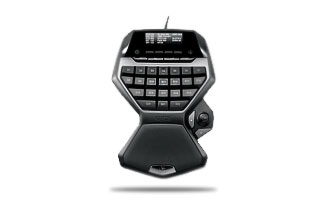
My G13 Review

G13

Ok I picked this up for WoW which strangely I’m playing less of, however there are tons of other games on my to play list that this will be useful for. Basically, it’s a USB mini-keyboard that uses Logitech’s key profiler software that allows you map the keys to a variety of things including single key presses, mouse clicks, and macros which can combine key presses, delays and mouse clicks.

A friend of mine suggested the Belkin n52te (http://www.n52te.com/) and I looked long and hard at both. Ultimately what I wanted was more buttons. In WoW alone I have every key mapped in one keyset (you can have 3 for your active profile) and in the n52te I would have had to overlap into a second or third keyset. Additionally, pairing the G13 with my G15 adds a second LCD so I have multi-mini-monitors. I use one for vent and the other for either CPU temp or performance monitor.

Size/Comfort
The actual device is as tall as my G15 with wrist wrest, has a nice curvy height for comfort, and is a little wider than my hand. There are usually display units at Best Buy for you to check these things out. But for me, it’s a little too big. My hands are between small and medium size and I feel like the unit is made for large hands. This is fine because if you made them for small hands then it would be far less pleasant for large handed people to use tiny keys. But I thought I’d note this because some keys like G1 and G7  are kind of far out there.

My biggest concern was going to be that my translation from keyboard to the gamepad would be uncomfortable because my thumb wouldn’t have a natural place to hit the spacebar equivalent. Fortunately the two keys by the joystick work out great for spacebar and the transition I’d say is nearly seamless.

WoW
Ok so for the most part the only game I’ve been using it for is WoW.  I’ve actually been playing a lot more War3 lately than WoW but unfortunately I can’t use the gamepad for War3. This isn’t the gamepad’s fault though! War3 and Starcraft don’t allow remapping of hotkeys for units, actually you can in War3 but it’s cumbersome. As you select new units/buildings in these games they keys for special abilities change even though the placement in the UI is in the same exact location. So anyway, the only game I can really start gushing about is going to be WoW and I have to say, the game feels a lot better.

My old layout was basically a default mapping of most things. QWEASD to move and strafe and 1 though = for abilities that I doubly mapped to the number pad. When I’d play I’d frequently move my right hand from the mouse to the number pad to fire off whatever spell I needed. In general this is ok except for target switching where I’d have to pray that tab would work well enough or I’d have to move my hand in the cast time of my spell back to my mouse. Also, camera motion and quick flipping becomes difficult as well. I used the number pad because I didn’t like having to look down to make sure I hit the 7 through = keys with the left hand. This is probably widely accepted as a poor setup but it’s what I got used to.

Now however, with the G13 I never have to move my hand off the mouse! All my number pad days on my right hand are now shifted to my left hand. I didn’t map the contoured keys (G4/G10/G11/G12) to WASD though which is what I’m sure they’re supposed to be bound to, or maybe for FPS anyway, but I did bind the joystick to QWES. So now I’m moving with my thumb and all the keys for the fingers are spells.

I was very concerned that it would be too hard to make the switch, but it’s been very easy so far. And since I have two actual monitors, I keep the key profiler up on the second monitor to double check. My main spells are pretty easy and were a great quick switch, but some of my abilities I use very infrequently but did map often I forget where they are.

One key that kind of sucks as a key is the joystick itself. You can map it’s up, down, left, right, and pressed as keys. But to press they joystick is incredibly difficult. So that kind of sucks. I wonder if wear will make it easier.

Software
Alright if you aren’t familiar with a G15’s keys and the profiler I’ll highlight how great this software is.  The G13 (and G15) both use a tray app that allows you to map your keys to profiles that can be locked onto running executables. This means when you setup your WoW profile, you can lock it to the wow.exe file and it will flip to WoW mode whenever WoW is the foreground app. Otherwise you have a default mode and whatever other games it auto detects. You can manually add in executables and turn this into a really nice productivity thing with macros as well, so you don’t have to pidgeon hole the device as a gaming only doodad.

If you find that you need more keys than the G13 offers, you have 3 different modes per profile. So for myself, my mage and my priest play very differently, and as such I have 2 different modes for WoW that accomodate them. They always seem to advertise the number of available keys as 87 (29 keys * 3 modes) but I don’t think it’s practical to switch modes while playing. I only say this because the mode buttons are at the top, but you can map any of the keys to the 3 different modes so if you had room for them to flip around then I guess it’s possible, but confusing. Perhaps more advanced people users would get more use out of that.

So besides just assigning normal keys to the buttons you can assign macros/scripts/text blocks/app shortcuts to them as well. I’ve not used scripts/text but for my default windows use on my G15 I have an array of app shortcuts mapped as well as cut/copy/paste. An example macro for my mage is blizzard/flamestrike. When you have these abilities hotkeyed and you press the hotkey, there requires a follow up mouse press to aim the spell. However in my G13/G15 setup I have it press the hotkey and then do a left mouse click after so I just have to have the mouse aimed and it will autofire. You can define delays between events (like if I want it to press the button and wait 1 second just to make sure I aim correctly) as well so you can be very specific. They allow a lot of control over what you want these buttons to do.

Conclusion
Overall I’m very pleased with the G13.  I’m only depressed that I won’t get a lot of use out of it for SC2 unless they allow remapping keys (and allow it to be easier than the War3 method). I mean honestly, what people want with the SC1/War3/SC2 keybinds that would be really easy is to translate the UI elements on the bottom right to the left side of the keyboard. So the top row of buttons are QWERT, the second row is ASDFG, etc.. But we’ll see. That aside, the price is kind of high. The only reason I bought it was due to Best Buy gift certificates I had that dropped the price a bit. But I suppose the extra price is worth it in the buttons, since like I said, the alternative was to have quite a few less.

Links for July 21, 2009

From my Google Reader shares

Desert Punk: Review

I don’t know where I even saw the advertisement for Desert Punk, and no one I know had seen it. But somehow, since I’m on a run for short series, I watched it because it was only 24 episodes.

The basic premise is that the guy is a mercenary in the desert far far into the future after nuclear war has destroyed the Earth. He’s this shrimpy guy but also somehow totally awesome. So the show follows his exploits as he does various jobs.

The show starts out pretty great and is very entertaining for a while, then at the point I hit the ending it all goes downhill. The show goes through what I now call “being Kenshin’ed” as apparently the show diverts from the manga and ends in a way that doesn’t make sense what-so-ever. Characters change radically in 6 episodes and the ending is just so horrible that I would only ever recommend the first 18 episodes and maybe try to read the manga, though I have yet to do that yet to see if the manga ending is any better.

Perhaps calling it Kenshin’ed is too harsh since the filler to Kenshin was just boring and not a horrible rewrite of all that I loved about the show.

Anyway, the show’s first 18 episodes are good, the last 6 are terrible. If you’re really bored you could watch it but without a true ending the show isn’t as memorable as the last few series I’ve been watching (Gurren Lagann and Last Exile).

Links for July 20, 2009

From my Google Reader shares

War3 Replays Part 4

Brutal | Crazy | Tense | TownTrade

The first three are 2v2 games and the last is a 3v3.

Games are posted in order of interest, so the first game is less interesting than the next. There’s a lot of back and forth gameplay. Tense is interesting because all 4 players are noobs who never expand so the endgame is a play on who can keep an expansion up.

Town trade is funny because we mentioned that we never use OT and so, Krib steps up to the plate.

Links for July 19, 2009

From my Google Reader shares

Starcraft 2 Prep Rant

When thinking about getting ready for Starcraft 2, it seems natural to think of playing Starcraft 1 or Warcraft 3. However Starcraft 2 is only just related to these games and playing them can teach you good things, but when you get hands on with Starcraft 2 you’ll find it quite different.

Starcraft to Stacraft 2
This is generally going to get you most acquainted with and prepared for SC2 except for the vast vast improvements in building grouping, resource gathering, and smartcasting.

War3 added in multiple building selection and allowing them to be hotkeyed, whereas in SC1 you can’t do this. Reading over Sirlin’s sit in at the SC class this semester I read that one of the pro gamers tip was that you hotkey one gateway and you double click it and quickly select each gateway nearby with hotkeys for unit creation for a rapid fire mass build. In SC2 you can just group all your gateways into one control group, press the hotkey, then for as many of the unit you want you press the unit creation key. So if you want 3 zealots you press z 3 times.

In SC1 you want to constantly produce your probe/drone/scv units. Since you can’t group buildings together, you have to manually check each town hall spot to create the unit. Additionally you can’t rally them to minerals/gas and have them start harvesting on production. So you must babysit them once created to get max use out of them. Again, in War3 you can rally straight to resources and have units begin gathering automatically. To me, the SC1 setup is very tedious, but it does force you to remember to keep producing your economy.

Starcraft 1 had no setup for smartcasting. If you had 3 templar and pressed the psi storm and fired it off, 3 would go off at once. You’d think this is great except the game didn’t allow stacking of psi storm, so 2 are wasted. In War3 they implemented a feature where the casters would cast one at a time in this situation. Tab subgrouping also really helps to quickly select your casting units, again something added into War3.

Other than that, SC1 should teach you the basics of SC2 very well. Many units are removed/replaced in SC2, but the fundamentals of economy, building, and unit counters are all there.

Wacraft 3 to Starcraft 2
So in all those points you’ll notice that War3 made great UI improvements which makes SC1 frustrating to play. I’m taking the War3 to SC2 route, but I’m also aware of the problems and differences in War3 style play to SC2 style play. War3 is a very hero-centric game with many RPG elements. Hard counters are not as hard as they are in SC2 and the economic model is far more simplistic.

The hero-centric nature of War3 means that for the most part, armies always move as one with the hero. Through the course of patching and such, they made it so that you don’t have to move with the hero (hero still gains exp if your hero isn’t around) but in the world of min/maxing I think it’s somewhat foolish to split your army away from your hero. Because of this, one of the main tactics I employed in my days of SC1 isn’t as easily done (coupled with the fact that you require a neutral building to do it anyway) which was always having a drop ready when my main army was in battle. Heroes are so powerful that you want them in the army to help turn the tides. An army fighting without a hero vs an army with one is most probably doomed.

The RPG element of leveling your heroes made games over long before the actual ending. You will find very few if any games where the victor had lower level heroes than the loser. How you play your hero and how early battles play out can many times plot the course of victory long before you see the summary screen. You can easily lose the game in the first 5 minutes and not even know it NOR make a large comeback in time before the more powerful hero presses his advantage.

Starcraft is a game of hard counters and low health. Battles can be over in the blink of an eye because of the unit matchups. In War3 you try to preserve anything and everything so that the enemy doesn’t get an exp advantage, but in SC tactics and map control are far more important than making sure the first zergling you ever made lives to the end of the game. War3 has a lot less of this and stresses the continued importance of micro during battle.

One thing about the economy in Starcraft that pro players do is they always have an scv/probe/drone queued up. You must have continued economic growth in Starcraft whereas in War3 you can only have so many people on the gold mine. That’s not to say you shouldn’t keep making peons in War3, but expanding is much more natural in SC than it is in War3, or at least, how I play War3, which can still be very incorrect. War3 has a sort of set it and forget it style about the single town economy. You only need so many guys on gold/lumber. In Starcraft you cannot have enough guys getting minerals ever, and if you do, you should be expanding to move excess onto the new hall.

Starcraft 2 gains the best parts of Starcraft 1 and Warcraft 3 and leaves the junk behind. And by junk I mean heroes. RTS games are all about economics, who has more resources on the battlefield, who is getting the most return on that investment, and how you are planning to incapacitate the enemy’s economy. You do this by evaluating what the opponent is showing you on the battlefield, responding appropriately, and combat while still keeping tabs on the basics like your probe production/teching. When you watch the best players play, their screen is just flashes of locations as they squeeze in just as much time as they need to on economy, combat, and  reconnaissance.

So what should you do to prepare yourself for SC2? It probably doesn’t matter if you’re choosing between SC1 and War3. SC1 is probably better for you since looking at the Protoss the transition to SC2 should be pretty seamless, although Terran are nearly 100% different. War3 will be more familiar control wise but fairly unfamiliar when you’re making units and deciding what to do.

Then again fundamentals are important. When teamed up with a new guy, you want to be able to say things that make sense to them and not totally confuse them. If you say “Go fiends/statues” you don’t want their response to be “Ok what do I do to make those?” This is probably a different topic altogether though. Maybe what I’m really saying is SC2 multiplayer prep.

So originally this was going to be a rant about how I would go about dissecting the game to teach a total noob how to play. I still think about this since there will be so many new people playing soon who don’t keep up as much as I obsess over it. So maybe this is something to look forward to.
Links for July 18, 2009

From my Google Reader shares